
Monitoring TrueFoundry AI Gateway traffic with Lunary
Posted: Jun 24, 2026.
Production-grade AI systems require strong operational foundations. Beyond building prompts and connecting to models, teams must manage routing, fallback behavior, cost visibility, performance monitoring, and debugging across multiple providers and workflows.
TrueFoundry and Lunary now work together to simplify this process. By pairing TrueFoundry's AI Gateway capabilities with Lunary's observability platform, teams gain a more efficient way to monitor, analyze, and improve their LLM applications in production.
Think of TrueFoundry as your intelligent traffic officer, managing access, rate limits, and model routing. While Lunary is your high-fidelity flight recorder, translating raw gateway data into clear, actionable visual traces. Together, they give you complete control and visibility over your production LLM traffic without slowing down your development cycle.
What is TrueFoundry AI Gateway?
TrueFoundry AI Gateway acts as a centralized control plane for your AI applications. Instead of hardcoding different API keys and SDKs for OpenAI, Anthropic, Gemini, or self-hosted models directly into your codebase, you route everything through a single, OpenAI-compatible endpoint. From this single hub, your engineering team can set up:
- Smart Routing & Fallbacks: Automatically switch to a backup model if your primary provider is down or rate-limited.
- Access Control & Guardrails: Enforce API key management, security compliance, and organizational quotas.
- On-Prem & Cloud Flexibility: Deploy where your data lives, keeping trace metadata completely inside your private VPC when needed.
True Power of the Integration: Zero-SDK Monitoring
Because TrueFoundry sits directly in the flow of every single LLM request, it is already in the perfect position to gather telemetry. Typically, to get deep observability into an AI app, you have to scatter tracking libraries and SDKs all over your codebase. This adds boilerplate code, introduces maintenance overhead, and risks slowing down your application. By connecting TrueFoundry to Lunary, you get instant, full-scale AI observability without writing a single line of instrumentation code. Once connected, TrueFoundry translates your traffic data into standard OpenTelemetry (OTEL) format and streams it directly to Lunary. With this you get:
- Full Conversations: Human readable prompt and response histories.
- Granular Metadata: Details like exact model versions, temperature, and user IDs.
- Cost Tracking: Real-time token usage and cost calculations.
- Performance Speed: Precise latency tracking for every hop.
- Error Diagnosis: Detailed traceback logs for failed API calls.
How It Works
The integration relies on OpenTelemetry (OTEL), the industry standard for cloud observability. TrueFoundry packages your request telemetry using OTLP (OpenTelemetry Protocol) over HTTP and sends it directly to Lunary's ingestion endpoints. Since this process happens asynchronously, it won't add any latency to your user-facing requests. Your applications talk to the gateway, the gateway responds instantly, and the telemetry is quietly streamed to Lunary in the background.
Prerequisites
To get this up and running, you only need three things:
- A TrueFoundry account with AI Gateway configured.
- A Lunary account.
- Your Lunary Public Key (which you can find in your Lunary dashboard under Settings → API Keys).
Step-by-Step: Configure Trace Export
To set up the connection, we just need to tell TrueFoundry where to send its telemetry.
- Log into your TrueFoundry dashboard and navigate to: Settings → Organisation → AI Gateway → OTEL Data Export Configuration
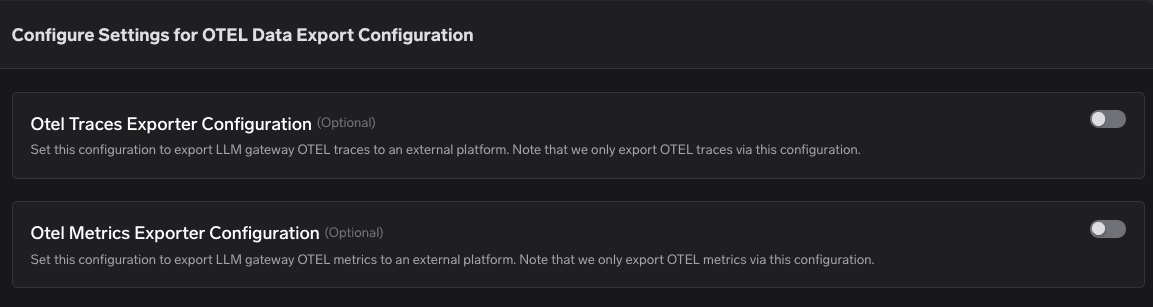
- Enable the OTEL Traces Exporter Configuration toggle.
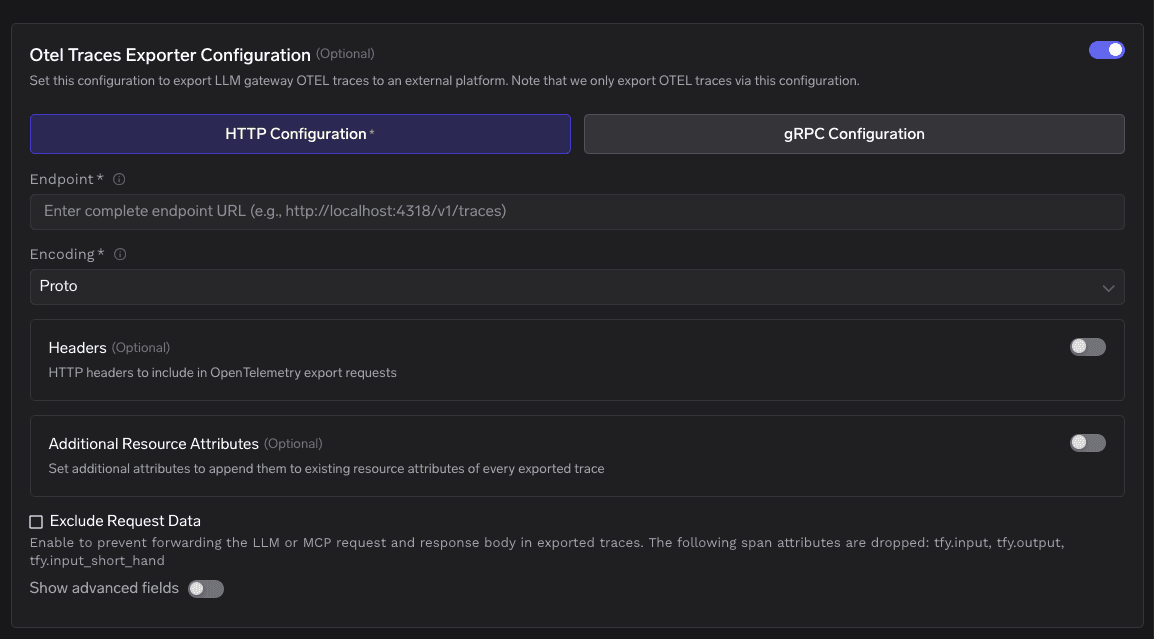
- Select HTTP Configuration and fill in the following parameters:
| Setting | Value |
|---|---|
| Endpoint | https://api.lunary.ai/v1/traces |
| Encoding | proto (or json) |
| Header | Authorization: Bearer <LUNARY_PUBLIC_KEY> |
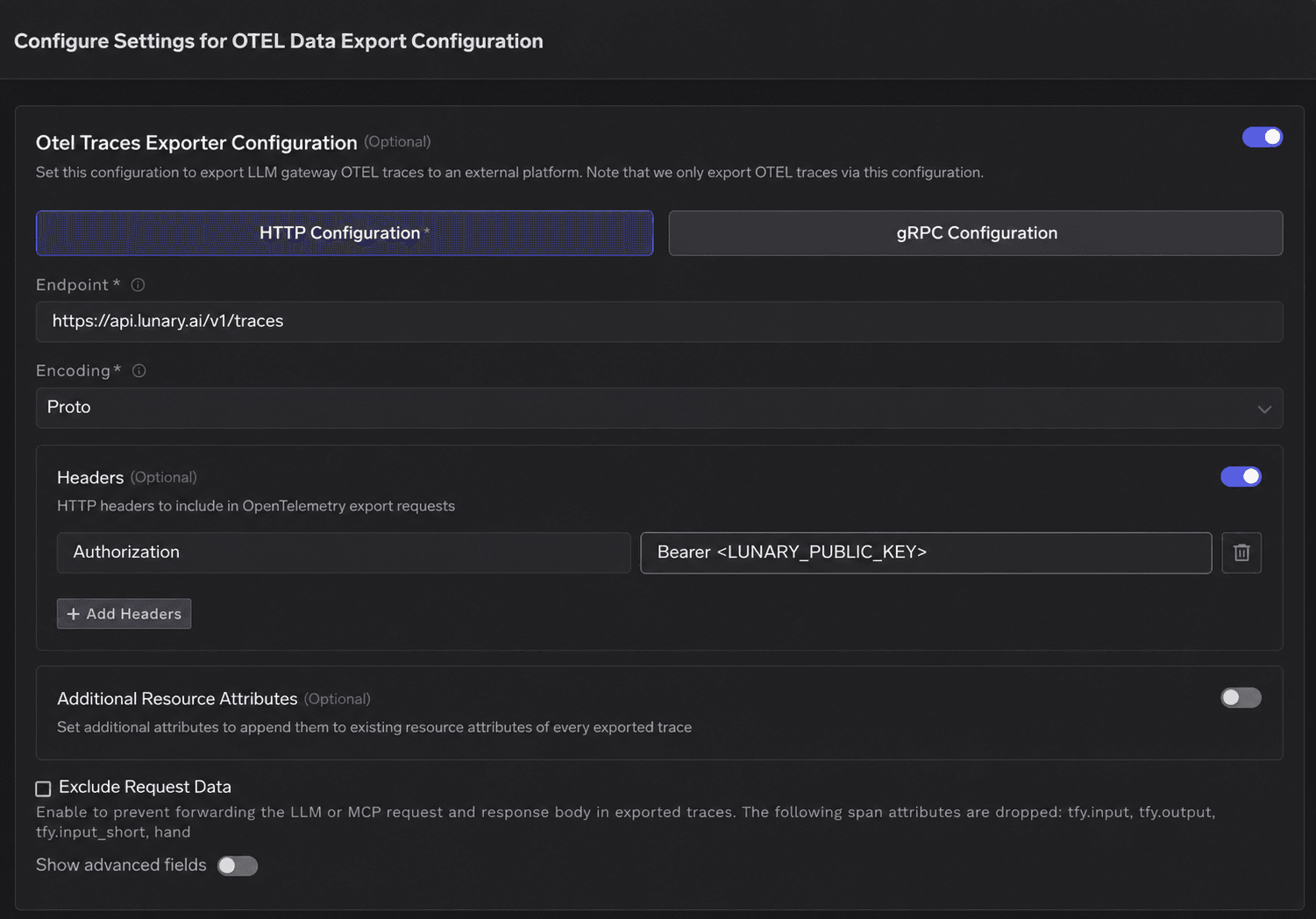
Make sure to replace <LUNARY_PUBLIC_KEY> with the actual public key you copied from your Lunary project settings.
Exporting Aggregate Metrics
While traces give you a microscopic look at individual conversations, metrics give you the macroscopic, "big picture" view of your system's health over time. If you want to track overall trends in error rates, traffic spikes, and average latencies, you can also export metrics to Lunary. To do this, enable the OTEL Metrics Exporter Configuration in the same TrueFoundry settings screen and use this endpoint: https://api.lunary.ai/v1/metrics
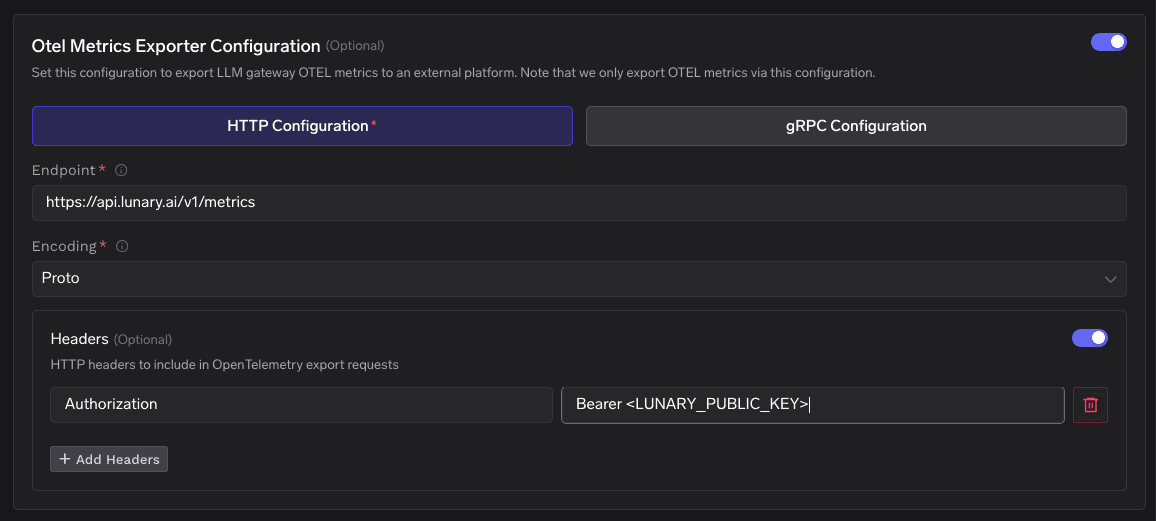
Keep the same HTTP encoding and Authorization header as your traces exporter. Once active, this aggregates your gateway activity into high-level dashboards, making it easy to spot systemic issues before your users do.
Verify Your Integration
Let's make sure everything is connected correctly:
- Save your newly configured exporter settings in TrueFoundry.
- Run a test request. You can do this by using the TrueFoundry Gateway Playground or by making a standard API call through your app.
- Head over to your Lunary dashboard and navigate to Explore → Traces.
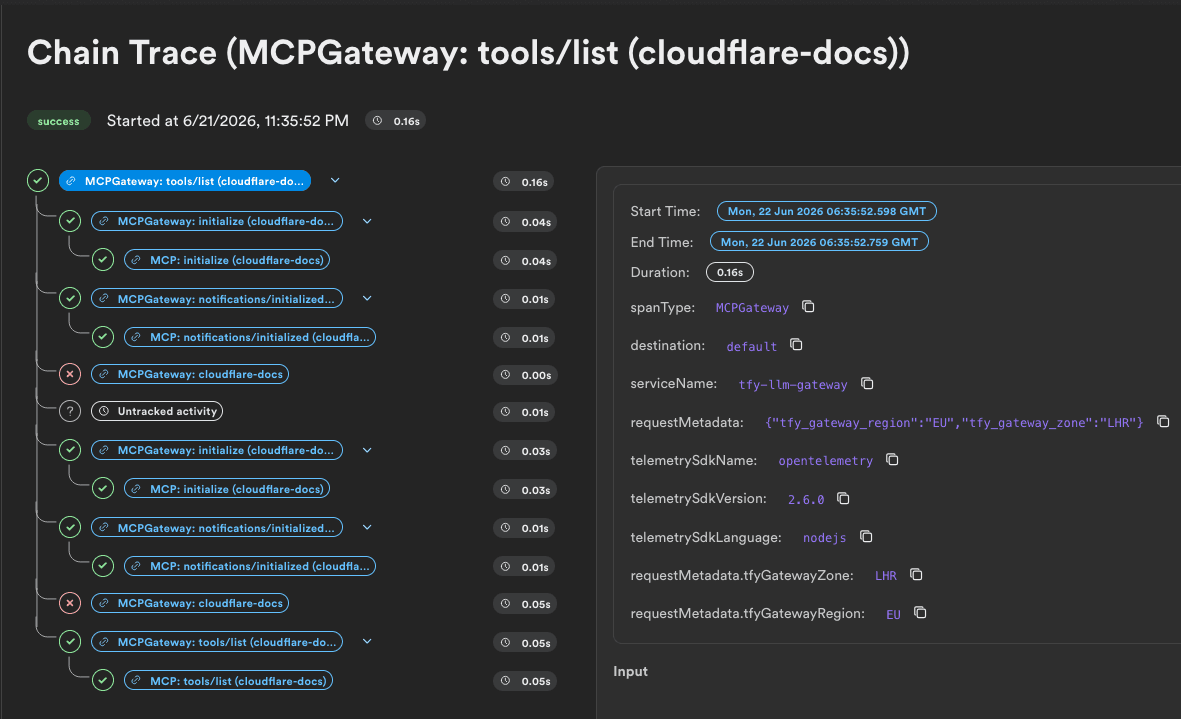
You should see a clean, structured trace showing up in real time. It will break down your request's duration, the exact tokens consumed, the model used, and any associated metadata.
From Raw Traffic to Real Insights
Once your gateway traffic is flowing into Lunary, you are no longer operating in the dark. Engineering and product teams can leverage this setup to:
- Optimize Costs: Identify which models or prompts are draining your budget and swap them out for more efficient alternatives.
- Debug Agentic Workflows: If you are building complex agents that make multiple tool calls and sequential model runs, Lunary automatically groups these related spans into a nested, easy-to-read waterfall chart.
- Improve UX: Easily isolate slow-running steps or pinpoint exactly why a certain user received an error.
By splitting responsibilities, i.e letting TrueFoundry run your production traffic and letting Lunary analyze it, you get the best of both worlds: a highly secure, reliable gateway and deep, clear insights to help you build better AI.
Ready to get started?
- For a detailed setup guide, check out the Lunary TrueFoundry Integration Guide.
- For deep-dives into advanced configurations, check out the TrueFoundry OTEL Data Export Tutorial.
Building an AI chatbot?
GenAI monitoring, prompt management, and magic.